
How to Make the A2O LITE NEON AI Dance Video From Two Photos
A step-by-step guide to the A2O LITE NEON AI dance, where one person dances alone in a white studio and the other appears from behind. Two photos, no dancing, about 10 minutes.
To make the A2O LITE NEON AI dance with A2O LITE NEON AI, upload one photo of each person, choose who stands in front, sign in and generate. About 10 minutes later you get a 15-second MP4 of those two people doing the NEON intro: one dances alone in a white studio, the other appears from behind, and they finish side by side. Nobody has to dance, and the two of you don't need to be in the same place. It's a one-time payment from $9.90, with no subscription.
Here is the whole process, using two sample coworkers, Dan and Kevin.
What you get
These frames come from the finished video made from the two photos below. Top left, the front dancer opens alone. Top right, the second person appears from behind his shoulder. Bottom row, the two dance the intro together and finish in a close-up.
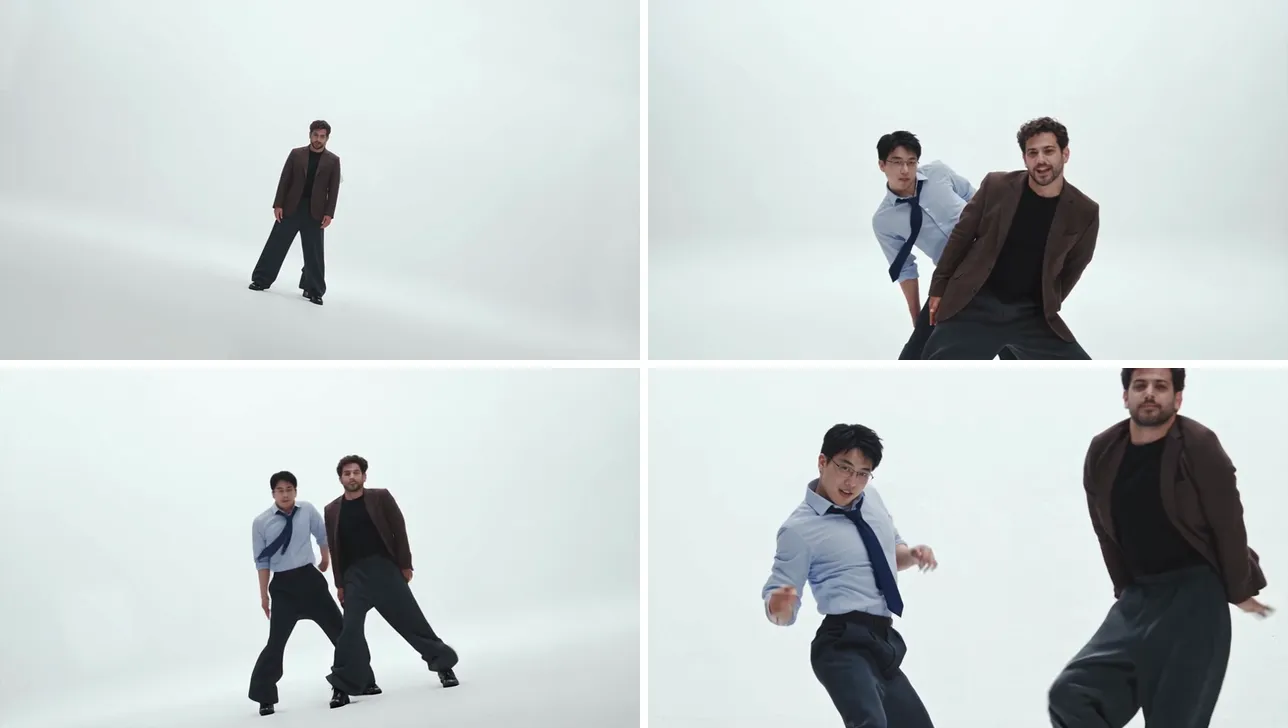
The video is a 15-second landscape (16:9) MP4, the same shape as the music video, in 480p (720p with the Plus pack). You download two files: one with the original NEON intro sound, and a silent copy for adding the sound inside TikTok or CapCut.
Step 1: Pick two photos
You need two photos with one person in each. They don't have to be taken together: each person can send a selfie from wherever they are.
What works best:
- The face is clear and front-facing, in good light.
- One person per photo. Crop out anyone else.
- Half body or full body. A full-body photo keeps the whole outfit; if the photo stops at the chest, the rest of the outfit is filled in to match.
- JPG, PNG or WebP, at least 512 × 512 px and up to 10 MB.
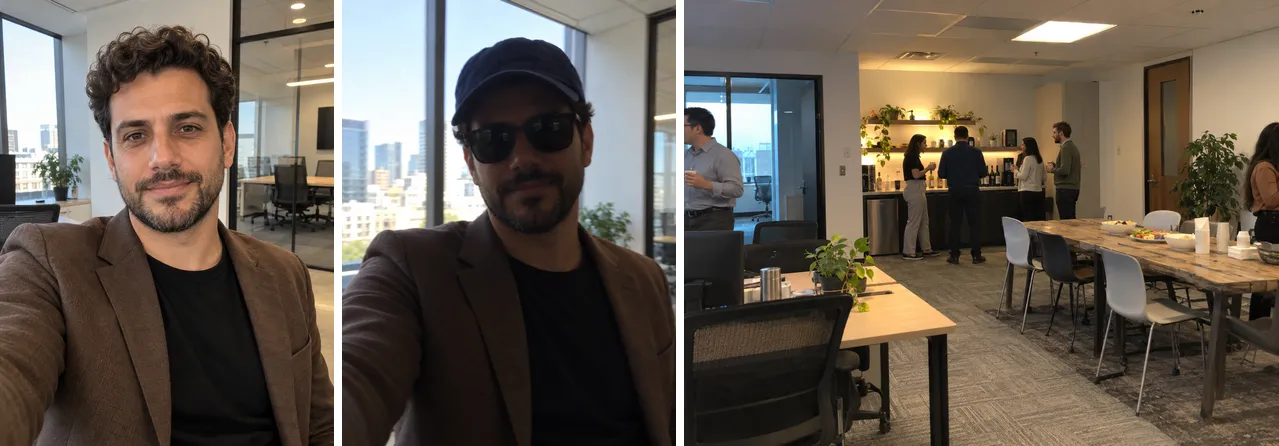
The selfie on the left works. The middle one hides the eyes and hair behind sunglasses and a cap, and the group shot on the right has faces too small to copy.
Only use photos of adults who agreed to be in the video.
Step 2: Choose who is in front
The NEON intro has two parts, so the generator has two slots:
- Front — opens solo. This person starts the intro alone in the white studio.
- Behind — steps out beside. This person appears from behind the first one, then dances beside them.
Changed your mind? The ⇄ button between the slots swaps the two photos.
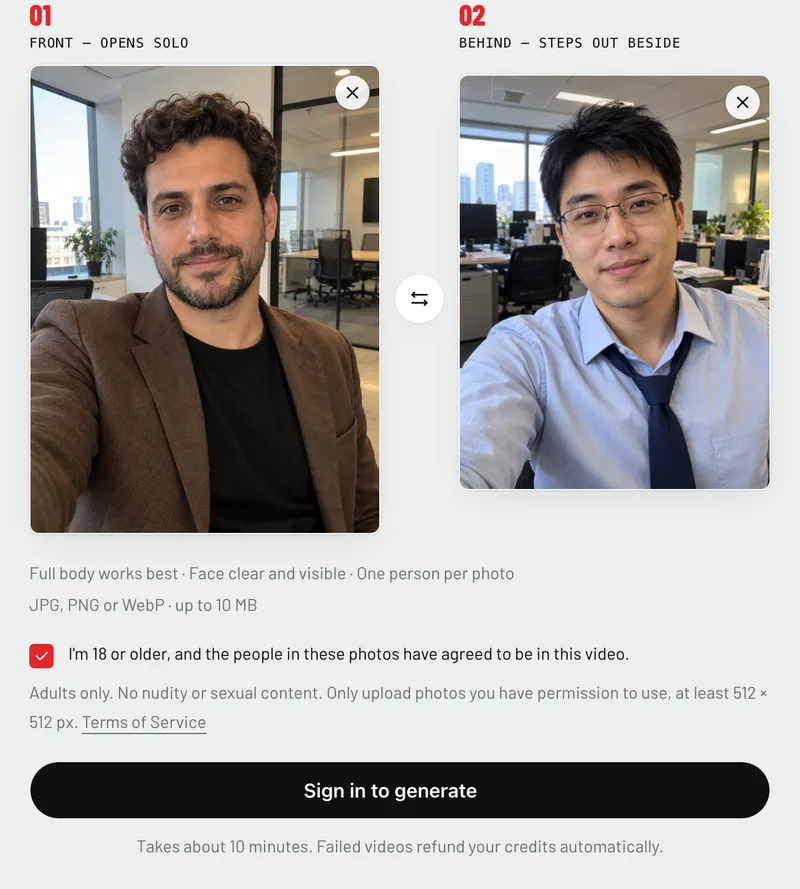
Tick the consent box to confirm you're 18 or older and that both people agreed to be in the video.
Step 3: Generate
Sign in (Google works) and pick a credit pack:
- Starter, $9.90: one 480p video.
- Plus, $15.90: two 480p videos, or one in 720p.
Both are one-time payments with no monthly plan, and credits don't expire. Press Generate. It takes about 10 minutes, a little longer when it's busy. You can leave the page: the video keeps going and waits for you on the home page and in My videos. If a video fails, its credits go back to your balance automatically.
Step 4: Download and post
Download the version with the NEON sound to post it as it is, or the silent copy to add the sound in the app. A few tips:
- Use the trend's sound on TikTok or Reels so your video shows up next to the other NEON covers.
- Going vertical? Put the 16:9 video on a 9:16 canvas in CapCut, or crop in on the two of you.
- Tag the other dancer. They'll want to repost it.
- Label it as AI. TikTok asks creators to turn on the AI-generated label for realistic AI content.
Troubleshooting
The face doesn't look like the photo. Use a brighter, front-facing photo without sunglasses, a hat or heavy filters.
The outfit changed. The outfit comes from the photo. Use a full-body photo to keep all of it.
The two people swapped places. Check which photo is in the Front slot; that person always opens the intro alone.
The video failed. The credits come back automatically. Try again with clearer photos.
A2O LITE NEON AI is an independent fan-made tool, not affiliated with A2O Entertainment or A2O LITE. Want to know where the dance comes from first? See what the NEON trend is.
Ready? Make your NEON duo.