
Best Photos for the A2O LITE NEON AI Dance, and What to Do When the Face Doesn't Look Like You
Which photos make the A2O LITE NEON AI dance look like you. Real results from a good photo, a side-lit photo and a covered face, why chat apps blur your photo, what happens to the outfit, and how to retry.
The best photo for the A2O LITE NEON AI dance shows the whole face, clearly: one person, looking at the camera, in even light, with nothing covering the face, in original quality, ideally head to shoes. That's the one rule that matters. In our test, two clear front-on photos gave a video of two people who look like themselves. A side-lit photo with the head turned, and a mirror selfie with the phone over the face, both gave someone who only resembles the person. If your video doesn't look like you, replace that photo and generate again.
The quick checklist
Before you upload to NEON Duo AI (a2oliteneondance.org), check each photo:
- One person. Crop out everyone else.
- Looking at the camera. Straight on, both eyes visible, not turned to the side.
- Even light on the face. No window or sun behind the person, no half of the face in shadow.
- Nothing over the face. No sunglasses, mask, hat brim, hand or phone.
- The face is big enough. Not a group shot or a photo taken from across the room.
- No beauty filter. Use the camera's normal photo, not an edited one.
- Original quality. Sent as a file, not a compressed chat photo, at least 512 px on the shorter side. JPG, PNG or WebP, up to 10 MB.
- Head to shoes if you can. It gives the outfit its best chance.
- An adult who agreed to be in the video. Both people must be 18 or older.
What we tested
We made videos of the same two people with different photos. They are AI-generated example people, not real customers, so we could show the photos.
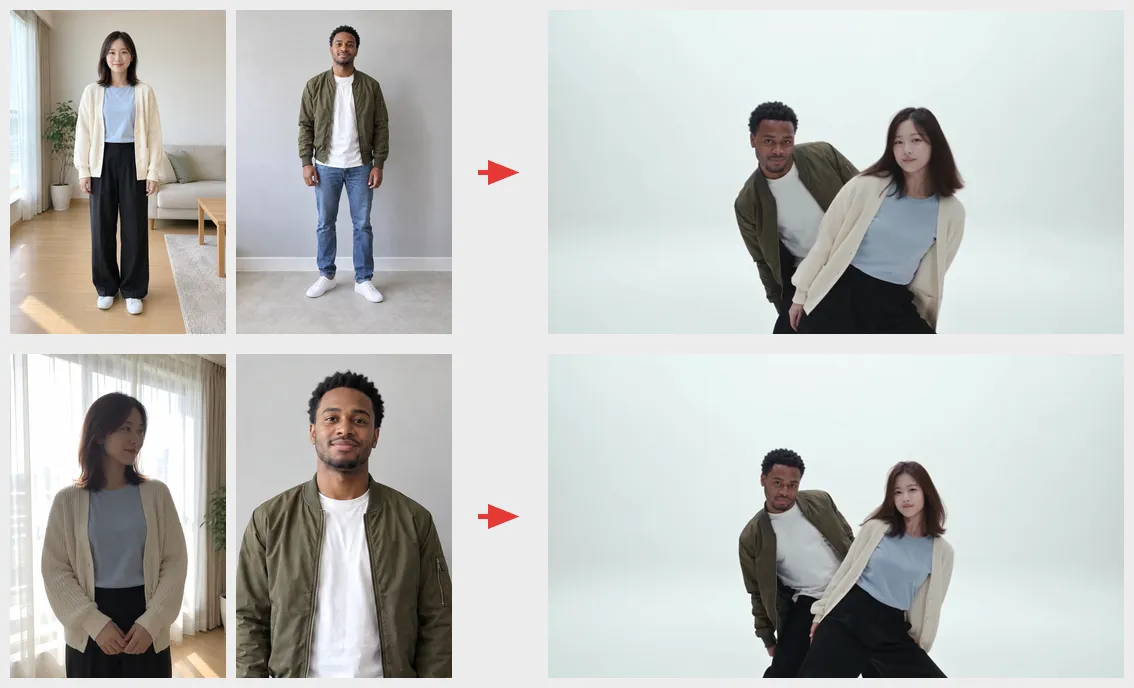
Clear photos (top row): this is what to aim for. Both people face the camera in even light, head to shoes. In the video they look like themselves. You can play this video on the home page.
Her face turned and backlit (bottom row): avoid. In her second photo she stands against a bright window with her head turned away, so half her face is hidden and the rest is in shadow. To a person it looks like a nice photo. The AI only saw part of her face, and the video shows a younger-looking woman with a rounder chin and different eyes: someone who resembles her, not her.
His chest-up photo in the same row was fine for his face. A chest-up crop only costs the outfit below the chest (see the outfit section).
Phone over the face: avoid. In a third video we used his mirror selfie, with the phone covering his nose and mouth. The AI had to invent the hidden half, and he came out with a longer face, a different jaw and a bigger smile.

This is a small test, so treat it as a guide, not a guarantee. The pattern is clear, though: the more of the face the photo shows, the more the video looks like you.
Why the face doesn't look like you
The video copies the face from one photo. What the photo hides, the AI has to invent, and an invented face looks like a stranger who resembles you. These are the usual causes:
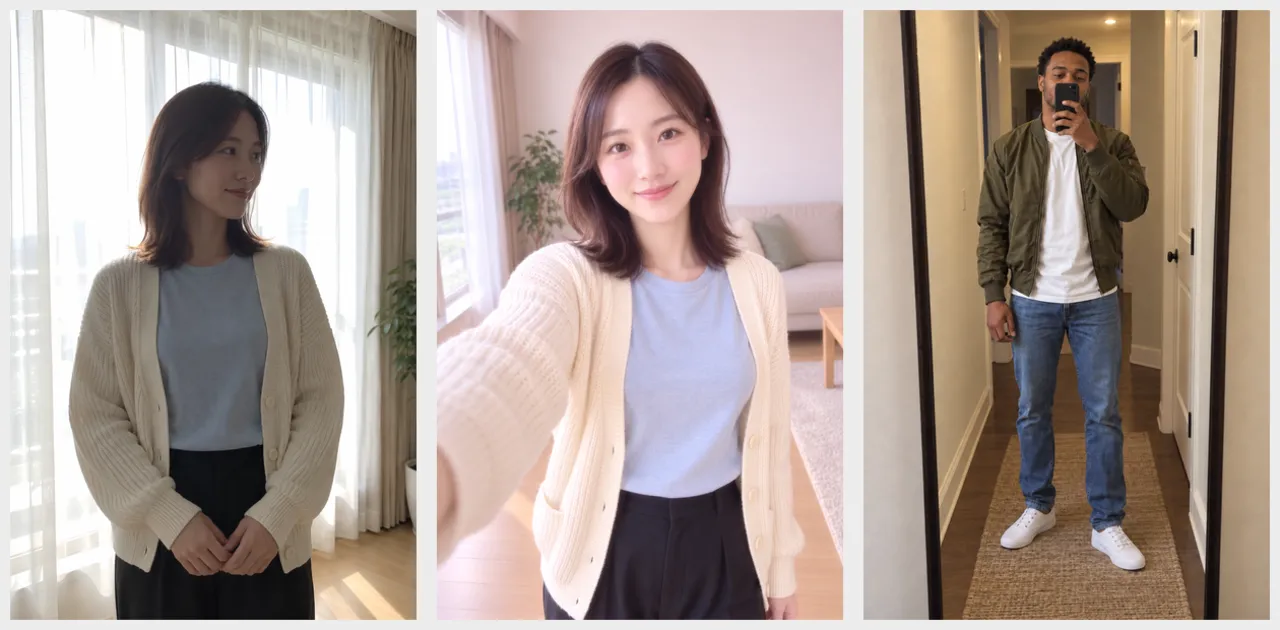
- Turned head or dark face. A side view hides half the face, and backlight or harsh shadow hides the details. This is the one people miss most, because the photo still looks good.
- Something over the face. A phone in a mirror selfie hides the nose and mouth, sunglasses hide the eyes, a mask hides half the face.
- The face is too small. In a group photo or a photo taken from far away, the face is only a few pixels once you crop it. Crop close enough that the face is clear, and check the cropped photo is still at least 512 px on the shorter side.
- Beauty filters. Smoothed skin, bigger eyes and a slimmer jaw get copied, so the video looks like the filter, not you.
- The photo was compressed. See the next section.
Chat apps blur your photo
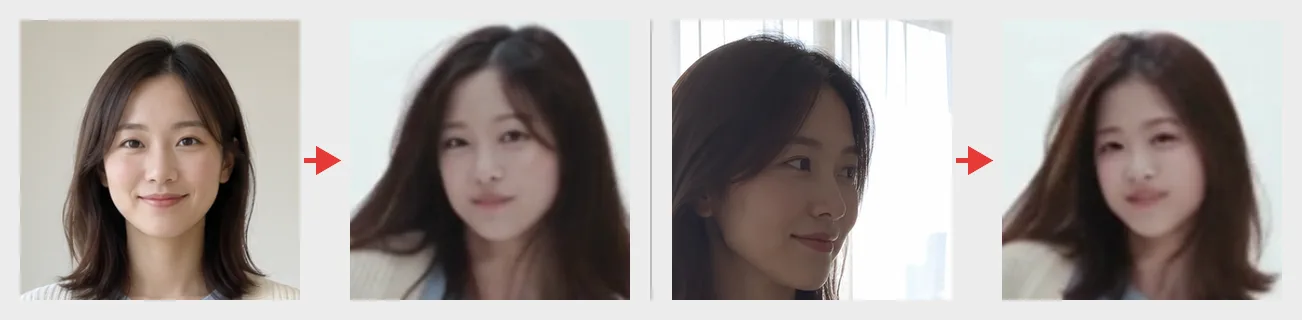
Most chat apps shrink photos to send them faster. On a phone screen the photo still looks fine, but the details of the face, like the eyes, the lips and the hairline, turn into blocks. Forward it a couple of times, or screenshot it, and it gets worse each time.
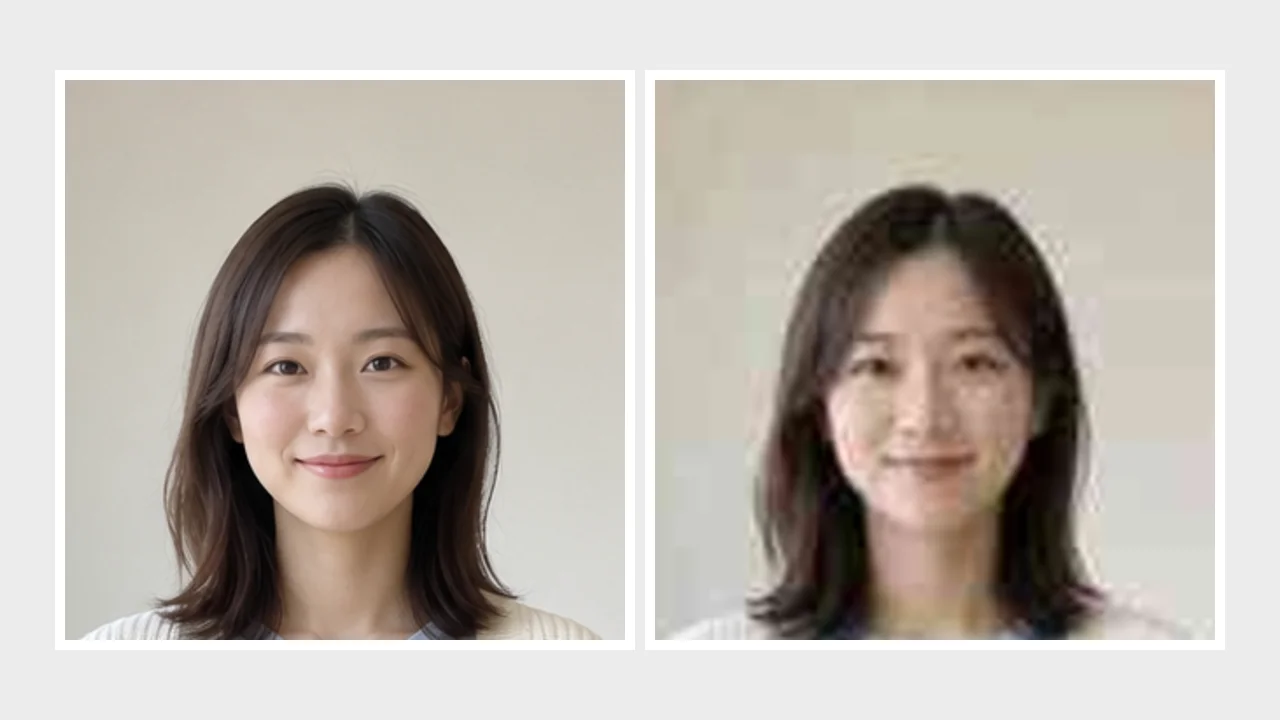
The right side above is a simulation: we shrank the original and saved it as a low-quality JPG three times, the way a photo gets forwarded around a group chat. Detail lost this way doesn't come back, and a screenshot of a forwarded photo, cropped down to one face, can drop below the 512 px minimum. Send the original whenever you can.
How to get the original:
- WhatsApp and Telegram: attach the photo as a document or file. That sends the original. The HD option is sharper than the default but still compressed.
- KakaoTalk: set the photo quality to Original (원본) before sending, not High quality.
- Or use AirDrop, Google Drive or email for the other person's photo.
- Never use a screenshot of a photo in a chat.
- Got a .HEIC file? iPhones often save photos as HEIC. Convert it to JPG first; the site takes JPG, PNG or WebP.
If you're making the video for two people, ask the other person for their photo the right way. There's a message you can copy in our long-distance guide.
Chest-up photos and the outfit
The outfit comes from the photo, but not all of it equally. In the video from the clear photos, both tops came out right: her cream cardigan and blue T-shirt, his olive bomber jacket and white T-shirt. His shoes stayed white sneakers. His mid-blue jeans came out dark navy, close to black, even from the full-body photo.
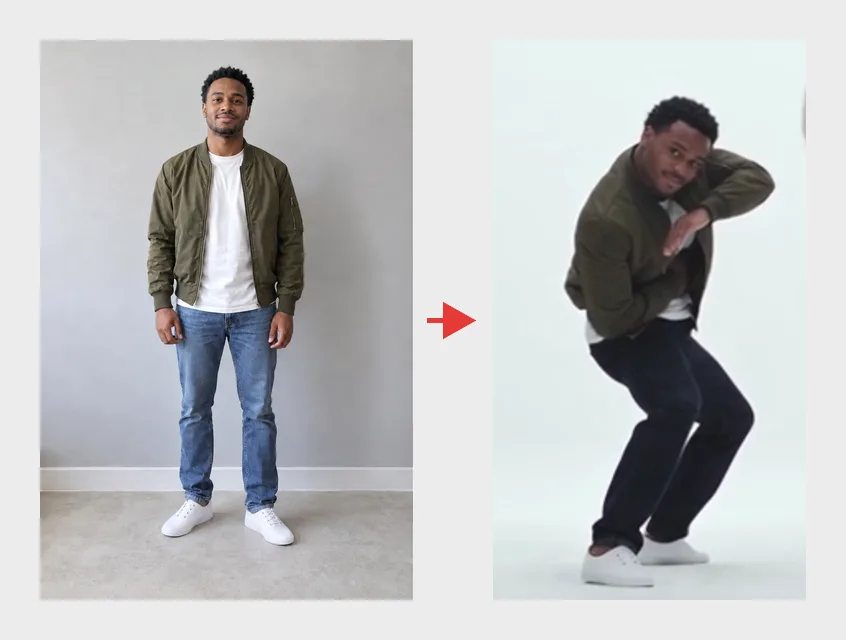
So:
- A full-body photo gives the outfit its best chance, but trousers can still change color.
- A chest-up photo works for the face. The top comes through; everything below it is made up to match.
- For matching couple outfits, match the tops. They're what reliably carries over.
After a failed or disappointing video
There are two different cases.
The video failed. You see "This one didn't work" and no video. The credits go back to your balance automatically. It's usually a network problem on the video service, so wait a bit and generate again with the same photos. If it keeps failing with the same photos, try a different photo of each person.
The video finished, but the face is off. The credits were used, because the video was made. Before you spend more, change the photo, not just your luck:
- Find the person who looks wrong. It's usually only one of the two.
- Replace only their photo with one that shows the whole face: looking at the camera, even light, nothing over the face, no filter, original quality.
- Check the slots. The Front photo opens solo; if the two people swapped places, use the ⇄ button.
- Generate again. If you're not sure your first photos will work, the Plus pack ($15.90) covers two 480p videos, which leaves room for one retry (or one 720p video, with no retry).
Generating again with the same photos gives a slightly different video, but it can't fill in a face the photo never showed.
Common questions
Can I use a selfie? Yes. A front-facing selfie with nothing over the face works well for the face. Hold the phone at eye level and at arm's length; very close selfies stretch the nose and face. Each person gets one photo, so if the outfit matters more, use a full-body photo taken with a timer or by a friend instead.
Can I use a mirror selfie? Only if the phone isn't in front of the face. Hold it low, at chest height, so the whole face shows in the mirror.
Will every second look exactly like me? Not always. Even with good photos, a face can look a little different in a few fast or close-up shots. The clearer the photo, the closer it stays.
Can I use one group photo for both people? No. Upload two photos with one person in each. Crop the group photo twice, one person per crop, and check each crop is sharp and at least 512 px on the shorter side.
Do glasses work? Clear glasses with no glare keep the eyes visible, so they should be fine. Sunglasses hide the eyes, so the AI has to guess them.
Can I use a photo of a celebrity or an idol? No. Only use photos of adults who agreed to be in the video, and to it being posted if you plan to post it. Don't use an idol, a celebrity or anyone from A2O LITE.
Can I use a photo of my child or my pet? No. You and both people in the photos must be 18 or older, and that includes an old photo: no childhood photos of adults either. Pets aren't supported yet.
New here? See how to make the A2O LITE NEON AI dance for the whole process, and how to post it on TikTok once it's done.
NEON Duo AI is an independent fan-made tool, not affiliated with A2O Entertainment or A2O LITE.
Ready? Make your NEON duo.