
How to Post Your A2O LITE NEON AI Dance on TikTok With the NEON Sound
Upload the silent copy, add the NEON sound from TikTok's library, turn on the AI label and tag the other dancer. Make a 9:16 CapCut version only if you want the video to fill the phone screen.
To post your A2O LITE NEON AI dance on TikTok, upload the silent copy from NEON Duo AI (a2oliteneondance.org), add the NEON sound from TikTok's own music library, turn on the AI-generated content label, mention the other dancer, and post. If you want it to fill the phone screen, make a 9:16 version in CapCut before you upload. Each step is below.
TikTok and CapCut move their buttons around between app versions. The names here are the ones in their help pages as of October 2026; if your app shows something slightly different, look for the closest match.
Which file to post
Every NEON Duo AI video comes with two downloads, Download with the NEON intro and Download silent. They are the same 15-second, 16:9 video.
- Post the silent copy, and add NEON from TikTok's library. The sound is licensed for use on TikTok, and your video gets linked to that sound's page, next to the other NEON covers, so people who tap the sound can find you.
- Keep the copy with the NEON intro for chats and timing. Send it to the other dancer, and play it once before posting to hear how the music should line up. If you upload it to TikTok, its audio counts as your own "original sound": the video isn't linked to the NEON sound page, and TikTok can mute videos that use commercial music this way.
Step 1: Make it vertical (optional)
The video is 16:9 landscape, the same shape as the music video. In the feed, TikTok plays it with bars above and below, and viewers can tap Full screen and turn the phone to watch it large (this button only appears when nothing is placed in the bars). That's fine to post as it is. If you'd rather fill the phone screen, make a 9:16 version first and upload that instead.
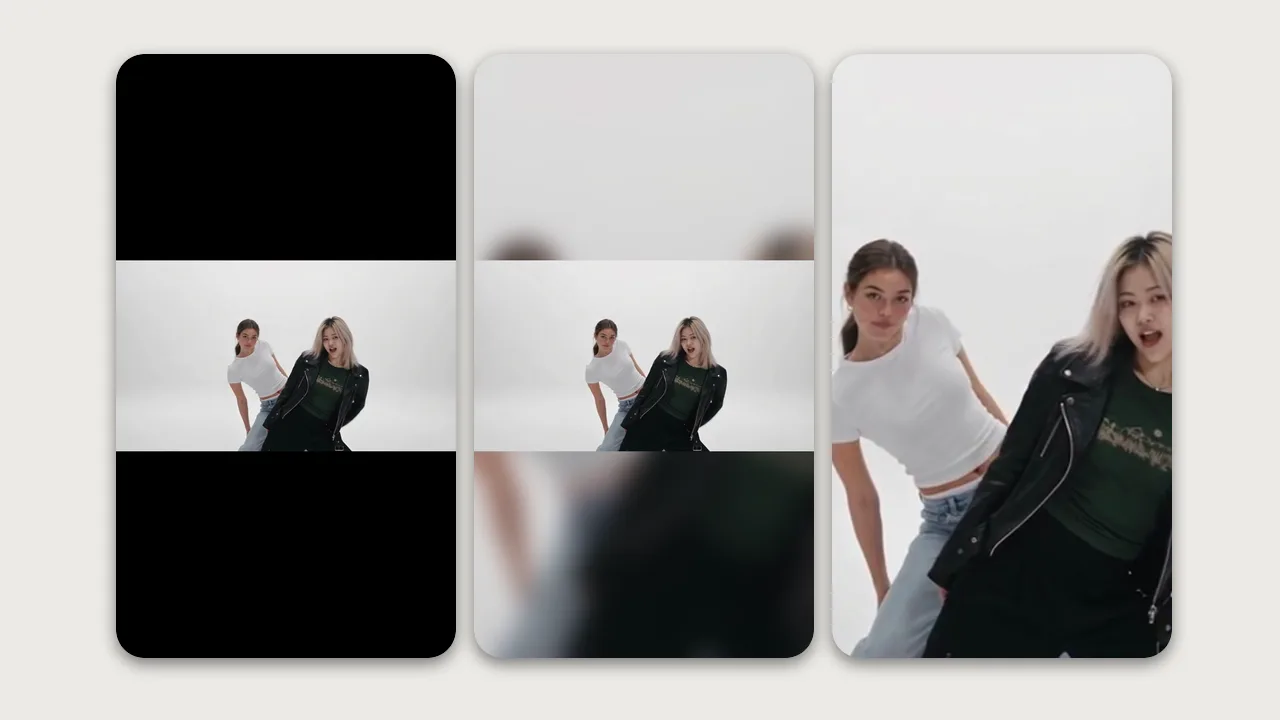
Three ways to do it, shown left to right above:
- Fit with bars. The whole video, black above and below. Nothing is cut, but it looks small.
- Fit over a blurred background. The whole video in the middle, with a blurred, zoomed copy filling the space. Nothing is cut and the screen feels full. This is the one we'd pick.
- Crop to fill. Zooms in until the video fills the screen. It cuts off both sides, so arms and sometimes a dancer go off screen. Filling a 1080 × 1920 screen also enlarges a 480p video 4 times (2.7 times for 720p), so it gets soft.
In the CapCut phone app:
- Tap New project and import the silent video.
- Tap Aspect ratio at the bottom and choose 9:16. The video now sits in the middle with empty space above and below.
- For the blurred background, tap the video, then Background and Blur. For a crop, pinch the video on the preview until it fills the screen.
- Play it through once and check both dancers stay in frame for the whole 15 seconds, especially at the reveal and the side-by-side finish.
- Export it, and upload that file in step 2.
Cropping can't bring back anything outside the original frame. If a dancer gets cut off, switch to the blurred background.
Step 2: Upload the video
- Get the file onto your phone. If you made it on a computer, send it as a file (AirDrop, Google Drive, email), not as a chat photo, so it isn't compressed.
- In TikTok, tap + (Add post), then Upload, and pick the video.
- Tap Next to get to the editing screen.
Step 3: Add the NEON sound
- Tap Add sound. Depending on your app version it's at the top of the editing screen, or under Sound at the bottom.
- Search for NEON A2O LITE. Pick the sound credited to A2O LITE or their label, not a fan reupload: TikTok removes sounds that break copyright, and every video using them goes silent.
- Tap Trim (or drag the sound) to choose where it starts. Move it until the part you heard in the copy with the NEON intro plays from the first frame, then play it back and check the first move lands on the beat.
- Adding a sound replaces the audio already in the file. If you still hear two tracks, open Volume and set Original sound to 0.
Can't find the sound? TikTok's music library depends on your region and account type. Business accounts only get the Commercial Music Library, which doesn't carry new K-pop releases like NEON. Switch to a personal account and search again, or post the video without music.
Step 4: Turn on the AI label
Before you post, tap More options and switch on AI-generated content. Viewers then see "Creator labeled as AI-generated" under your caption.
Do this every time. TikTok requires a label on realistic AI content, and an AI video of real people doing a dance they never filmed counts. TikTok says turning it on doesn't affect distribution if the video follows its Community Guidelines. Realistic AI posted without a label can be removed, restricted or labeled by TikTok itself. Once posted, the label can't be removed.
Step 5: Write the caption and hashtags
TikTok search reads the caption, the sound and any text on the video. Your clip has no speech, so put "A2O LITE NEON" in the caption and, if you like, as a short line of text on the video. Then add a few hashtags that describe this video. A long list of loosely related hashtags doesn't help and can hurt.
Captions you can copy:
Me and my sister doing the A2O LITE NEON intro, made with AI 🤍 #NEON #A2OLITE #A2OLITENEON #AIdance
She leaned out from behind me like the MV 😭 NEON intro, AI version #A2OLITE #A2OLITENEON #AIdance
Two cities, one white studio. Long-distance NEON duo (AI) #A2OLITENEON #NEON #longdistance
Tips:
- Three to five hashtags is plenty: the song, the group, and what makes yours different (#AIdance, #coworkers, #longdistance).
- Say it's AI in the caption too, like "made with AI" or "AI version". It answers the "is that really you?" comments before they start.
- Write it as a fan post. Don't present yourself as A2O LITE, use the group's logos, or name the members as the dancers in your clip.
Step 6: Mention the other dancer
On the post screen, type @ in the caption and pick their account, or tap @ Mention and search for them. They get a notification and can repost it. Duet and Stitch stay available only if you leave Allow Duet and Allow Stitch on for that post.
A mention only works if their privacy settings allow mentions from you (Settings and privacy → Privacy → Mentions and tags). If their name doesn't come up, ask them to check that setting, or just send them the video directly.
Both people in the video must be 18 or older and must have agreed to be in it and to it being posted publicly. Tag only those two people.
Posting on Instagram Reels or YouTube Shorts
Each app is a separate upload with its own music library and rules:
- Use the silent copy and add NEON from the app's music library if it's offered for your region and account. Instagram can mute uploaded commercial music, and YouTube's Content ID can block it.
- Use your 9:16 CapCut version if you want the video to fill the screen.
- Label it as AI. On Instagram, turn on Add AI label before you share. On YouTube, answer Yes to the altered or synthetic content question when you upload.
Common questions
Why does my video have black bars on TikTok? It's a 16:9 landscape video in a vertical feed. With nothing placed in the bars, viewers can tap Full screen. For a video that fills the screen, upload the 9:16 blurred-background version from CapCut (step 1).
The sound is out of sync with the dance. Tap Trim on the sound and move the start point until the first move lands on the beat. Play the copy with the NEON intro next to it as a timing reference.
The video is suddenly silent. TikTok mutes videos when their sound is removed for copyright. Open the video's details and change the sound to the NEON sound credited to A2O LITE, if it's still available. If you uploaded the copy with the NEON intro, delete that post and upload the silent copy with the library sound.
Will the AI label hurt my views? TikTok says the setting doesn't affect distribution if the video follows its Community Guidelines. Leaving realistic AI unlabeled is the bigger risk.
Can we both post it? Yes. Each of you can post the silent copy with the same NEON sound and the AI label. Or one posts and the other reposts.
Haven't made your video yet? Start with how to make the A2O LITE NEON AI dance, and see which photos work best so it looks like you.
NEON Duo AI is an independent fan-made tool, not affiliated with A2O Entertainment, A2O LITE or TikTok.
Ready? Make your NEON duo.